- Scratch interface and project setup
- Sprites and backdrops
- X/Y coordinates and events
- Keyboard controls and variables
- Create a custom cube player
- Build ground and background
- Introduce gravity and jumping
About Program
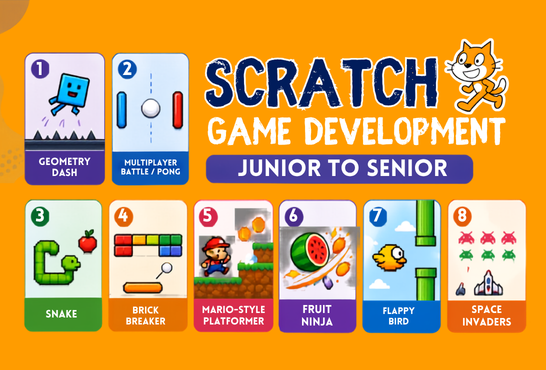
Scratch Game Development: Junior to Senior is a hands-on journey designed to take students from beginner-level Scratch skills to advanced game development. Students will build exciting games while learning movement, physics, collision detection, clones, scoring, levels, power-ups, scrolling, and boss battles. With every game, students take on new challenges, strengthen their problem-solving skills, and learn how real games are designed and developed. The course concludes with students creating and presenting their own original Scratch game.
Course Outline
Game 1: Geometry Dash
Lectures 1–2 • Junior • Movement, Jumping, Gravity & Obstacles
Lecture 1: Build the Player & Basic Movement
Focus: Scratch Fundamentals & Player Movement
Lecture 2: Obstacles, Collision & Scoring
Focus: Collision, Clones & Game Systems
- Collision detection
- Spikes and obstacles
- Clones and scrolling
- Score system
- Game Over and restart
- Increasing difficulty
🏆 Create a personal best system and design custom obstacle patterns.
Game 2: Multiplayer Battle / Pong
Lectures 3–4 • Junior • Two-Player Controls & Game Logic
Lecture 3: Two Players & Game Controls
Focus: Multiplayer Controls & Ball Physics
- Multiple sprites
- Player 1 and Player 2 controls
- Keyboard events
- Boundaries
- Ball movement and bouncing
- Arena design
- Separate controls for each player
Lecture 4: Scoring & Multiplayer Logic
Focus: Scoring, Broadcasts & Win Conditions
- Ball collision
- Score variables
- Broadcast messages
- Win conditions
- Game states
- Restarting a match
⚡ Add power-ups and create different arenas.
Game 3: Snake
Lectures 5–6 • Intermediate • Grid Movement, Growth & Collision
Lecture 5: Snake Movement & Food
Focus: Grid Movement & Game Variables
- Grid movement
- Direction variables
- Random food positions
- Score
- Game boundaries
- Arrow-key controls
- Basic snake movement
Lecture 6: Snake Body & Game Over
Focus: Growth, Clones & Self-Collision
- Snake growth
- Clones
- Self-collision
- Wall collision
- Game Over
- Speed increase
🐍 Add obstacles, bonus food and poison food.
Game 4: Brick Breaker
Lectures 7–8 • Intermediate • Paddle, Ball Physics & Power-Ups
Lecture 7: Paddle, Ball & Bricks
Focus: Paddle Controls & Ball Physics
- Paddle movement
- Ball physics
- Bouncing
- Collision detection
- Brick arrangement
- Keyboard or mouse controls
- Random launch direction
Lecture 8: Levels, Lives & Power-Ups
Focus: Game Progression & Power-Ups
- Brick destruction
- Score
- Lives
- Level system
- New brick layouts
- Game Over and winning screen
- Power-ups
🎁 Bigger paddle • Multi-ball • Slow ball • Extra life
Game 5: Mario-Style Platformer
Lectures 9–10 • Advanced • Gravity, Platforms, Enemies & Levels
Lecture 9: Platformer Physics
Focus: Gravity, Jumping & Platform Collision
- Gravity
- Jumping
- Horizontal movement
- Platforms
- Ground detection
- Velocity and jump strength
- Player collision with platforms
Lecture 10: Enemies, Coins & Levels
Focus: Enemies, Collectibles & Level Systems
- Coins and collectibles
- Enemy movement
- Lives
- Checkpoints
- Goal/level completion
- Scrolling camera
👾 Add moving platforms and a boss enemy.
Game 6: Fruit Ninja
Lectures 11–12 • Advanced • Clones, Gravity, Slicing & Combos
Lecture 11: Fruit Launching System
Focus: Random Spawning & Projectile Movement
- Random spawning
- Gravity
- Projectile movement
- Multiple sprites
- Clones
- Timer
- Fruit launch trajectories
Lecture 12: Cutting, Scoring & Game Over
Focus: Mouse Tracking, Collision & Scoring
- Mouse tracking
- Collision detection
- Slice effect
- Score
- Bomb penalty
- Timer and game states
🍉 Add combos, critical hits and golden fruit.
Game 7: Flappy Bird
Lectures 13–14 • Senior • Physics, Scrolling & Difficulty
Lecture 13: Bird Physics & Pipes
Focus: Gravity, Velocity & Smooth Physics
- Gravity
- Flapping
- Vertical velocity
- Moving obstacles
- Random pipe gaps
- Collision detection
- Smooth physics
Lecture 14: Infinite Scrolling & High Score
Focus: Infinite Scrolling & Game Progression
- Pipe generation
- Scrolling
- Score when passing pipes
- High score
- Game Over and restart
- Difficulty progression
🏅 Add medals and a day/night mode.
Game 8: Space Invaders
Lectures 15–16 • Senior • Shooting, Formations, Levels & Boss Battle
Lecture 15: Shooter Mechanics
Focus: Projectiles, Enemies & Clones
- Shooting
- Projectiles
- Enemy movement
- Multiple enemies
- Clones
- Collision detection
- Laser and explosion systems
Lecture 16: Boss Battle, Levels & Final Game
Focus: Advanced Game Systems & Final Polish
- Multiple levels
- Enemy formations
- Lives and shields
- Boss health
- Explosion animation
- Victory and Game Over screens
- Final game polish and presentation
🚀 Complete and present a polished Space Invaders game with a boss battle.
Recorded Lectures will be uploaded here.
Nourishing the Programmer in you!
schoolofseedprogramming@gmail.com
query@seedprogramming.org
Hello 👋
Can we help you?
Need more information about Scratch – Junior To Senior
Can we help you?
Need more information about Scratch – Junior To Senior
Open chat